Sensors and peripherals
Everything that hangs off the core once the two boards are joined — where each part sits, how it is held there, and which way it faces.
IMU — ICM42688P
The one sensor the aircraft cannot fly without: a 6-axis MEMS gyroscope and accelerometer, and
a high-performance one by consumer-grade standards — low gyro noise, and little offset drift
over temperature. Figures below are from the TDK datasheet, document DS-000347 rev 1.8.
ICM-42688-P
| Resolution | 16-bit, or 19-bit gyro and 18-bit accel through the FIFO |
| Max ODR | 32 kHz |
| FIFO | 2 kB |
| Interface | SPI up to 24 MHz, I²C up to 1 MHz, I3C up to 12.5 MHz |
| Supply | 1.71–3.6 V |
External crystal (optional)
Every sample the IMU takes is timed by a clock, and by default that clock is an oscillator on the sensor's own die. It moves with temperature at the percent level. Attitude is gyro rate integrated against the sample interval, so that error scales the integrated angle, and no tuning removes it because it is not a bias.
A TCXO — temperature-compensated crystal oscillator — answers this. It is a crystal that corrects its own drift as it heats and drives its own output, holding a few ppm where a bare 32.768 kHz crystal would wander by tens.
Pin 9 of the ICM-42688-P doubles as CLKIN. Feed a clock in and it overrides the internal
oscillator. INT2, the pin's other function, is unused here, so it costs one component and
three wires. Worth doing if you are up for the micro-soldering — see
what you need to be able to do.
The reference build uses a KDS DSK321STD — 3.2 × 2.5 mm, ±5 ppm across −40 to +85 °C, about 1.7 µA.
Note
Any frequency from 31 to 50 kHz works. The firmware adjusts its timing to whatever you declare, so 32.768 kHz is what the reference build happens to fit, not a requirement.
Warning
The reference build already has this switched on, and expects a 32.768 kHz clock on
pin 9. If you choose to skip it, turn it off under make 32raven-menuconfig
→ STM32 → Peripherals → IMU (ICM42688P) → Clock before you fly. The default is
off; this build is the exception.
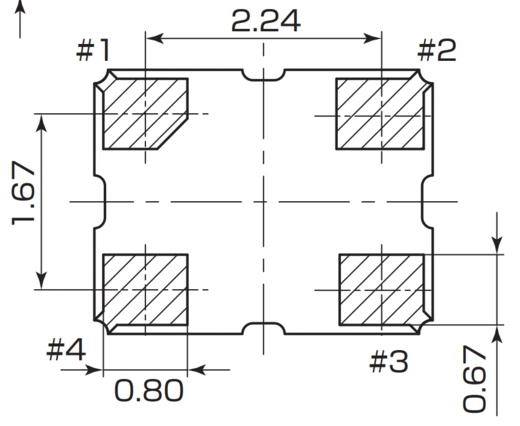
| TCXO pad | Function | IMU breakout pad |
|---|---|---|
#1 + #4 |
Vcc — bridged | 3V3 |
#2 |
GND | GND |
#3 |
Output | INT2 |
Pinout and land pattern from the KDS datasheet, dimensions in mm.
Glue first. The oscillator goes down on a drop of silicone with pad #3 facing the breakout's
INT2 pad, so the output run has nowhere to go but straight across.
Once it has cured, wire it. All three runs are enamelled, stiff enough to hold the shape you
bend into them. The output is the run that matters and the shortest: #3 to INT2, a few
millimetres, no detour.
Vcc lands on two pads, #1 and #4, the pair on one long side of the package — the part will
not run off one alone. Bridge them with a bar of solder and feed the bridge from a single wire;
the short in the photographs is deliberate.
Supply and ground both go round the edge of the breakout to the 3V3 and GND pads on the
back, held flat on the way with Kapton tape.
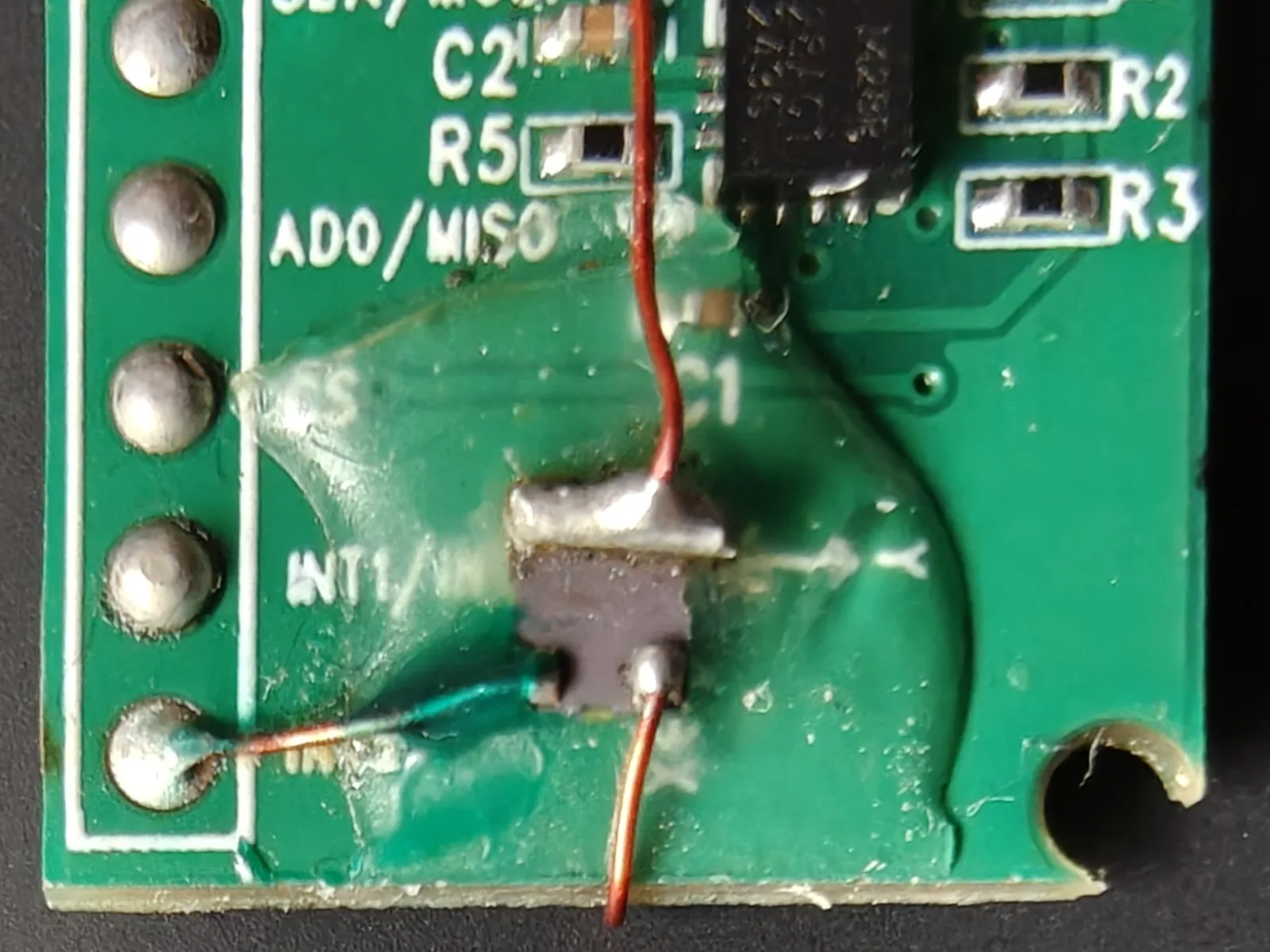
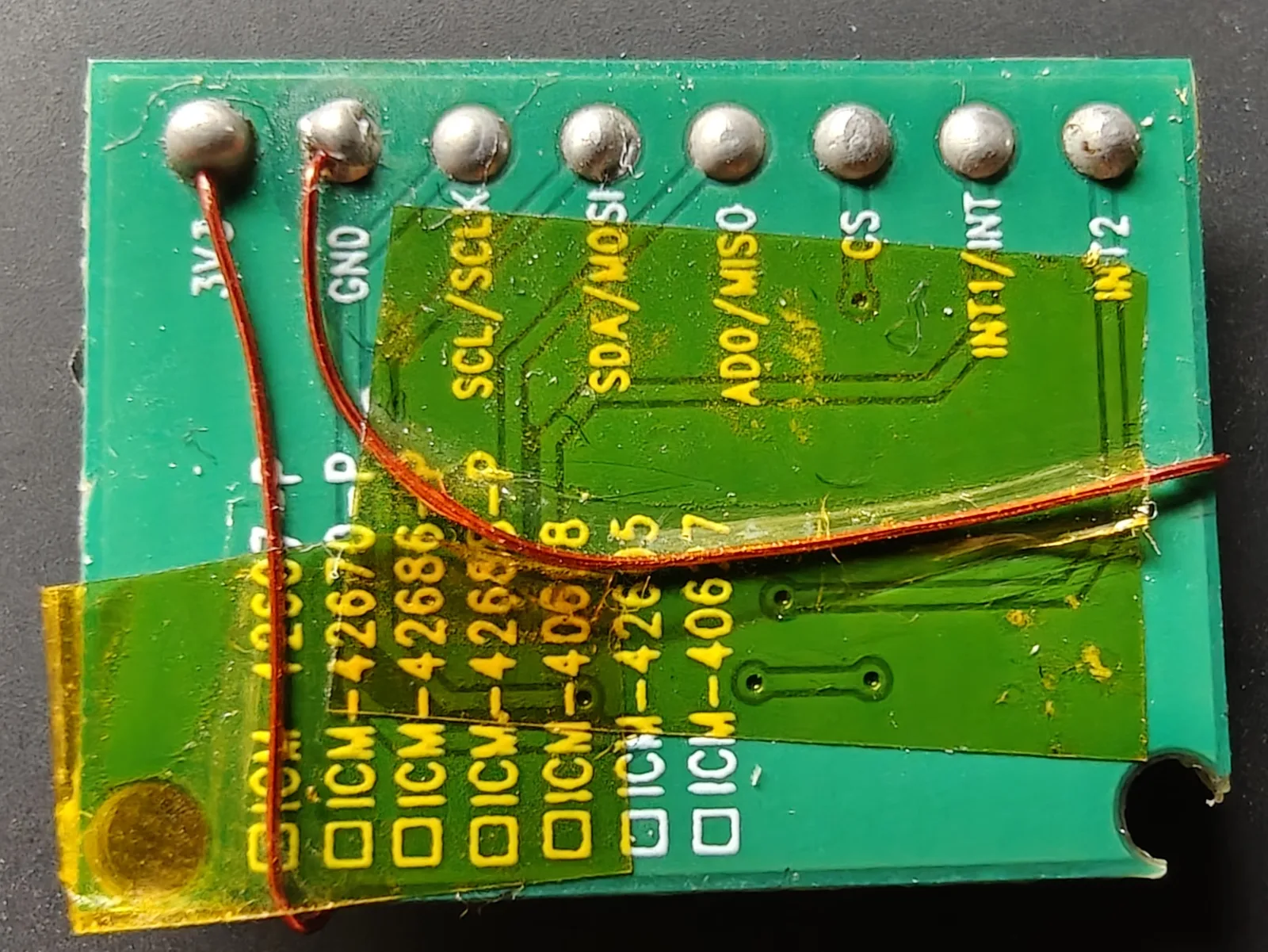
Left — the oscillator on the front, bedded in silicone. The solder bar across its top edge
is #1 and #4 bridged; the green wire runs from #3 to the INT2 pad. Right — the back,
where the supply pair lands on 3V3 and GND.
Note
The oscillator can take up to 3 seconds to start. That is far longer than the STM32 takes to boot, so the IMU may see no clock at all on its first attempt at initialising.
Mounting
Cut a square of foam tape to the size of the STM32's package, stick it to the top of the chip,
and press the sensor breakout down onto it with its Y arrow (silkscreened just left of C1)
pointing at the USB/SWD end of the flight computer.
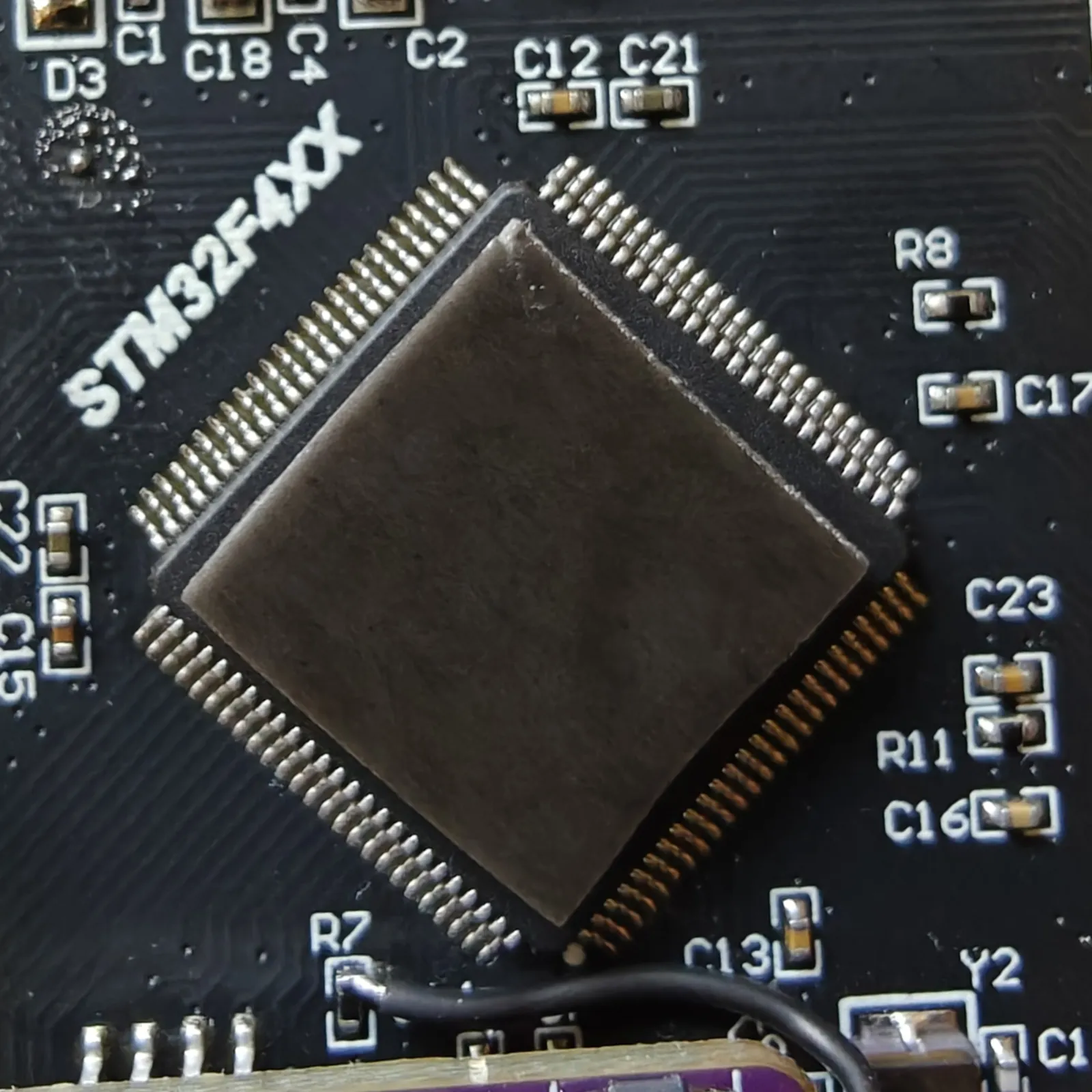
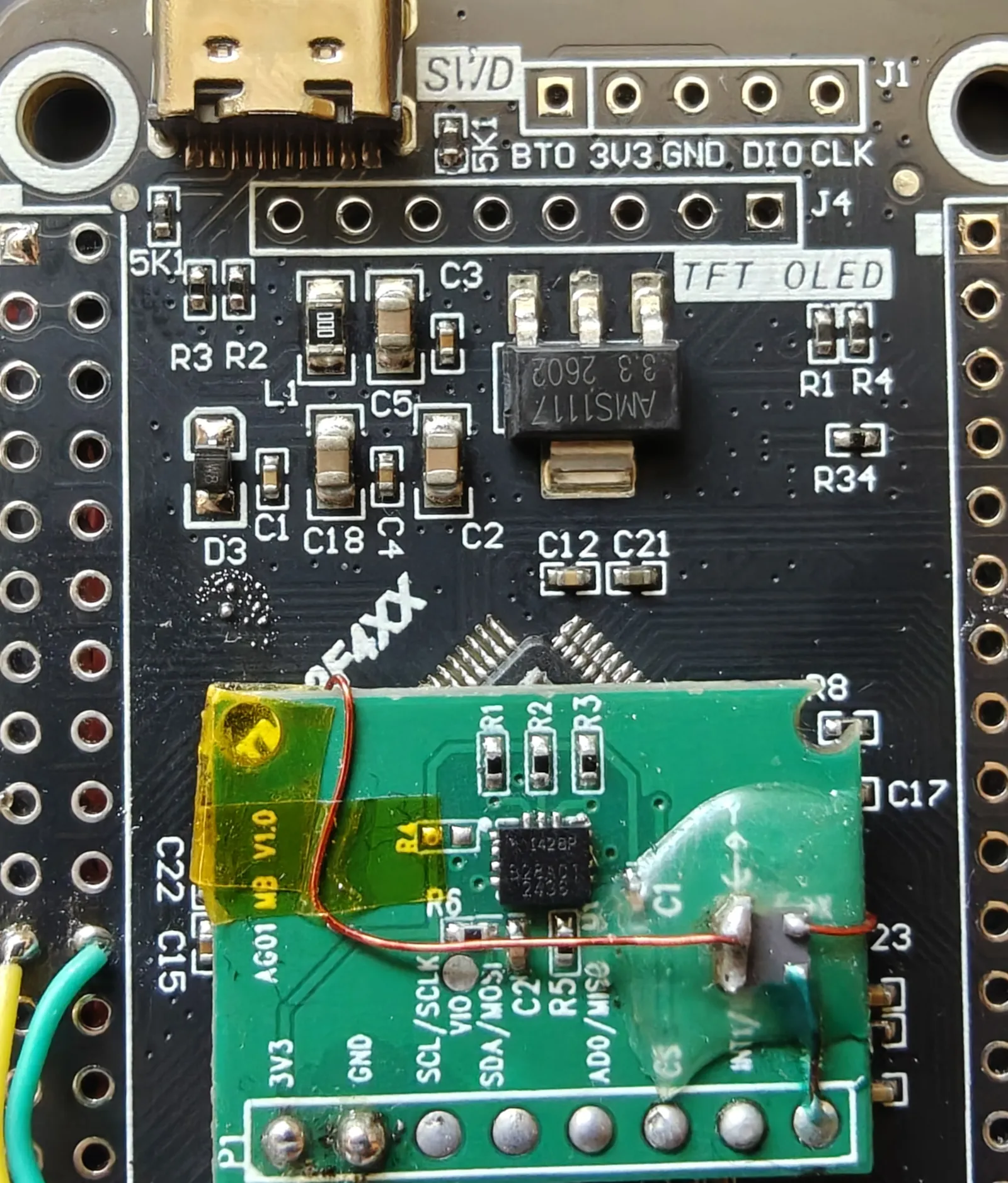
Left — the tape cut square to the package, on the chip's own 45°. Right — the sensor
down on it, Y pointing at the USB/SWD end.
Caution
The breakout overhangs the chip's leads on all four sides. The package lid stands proud of the leads and the tape adds to that, so a clean board clears them — but check the underside for stray solder before you press it down. A blob there lands across a row of QFP pins.
Note
The tape is a damping layer too, not just adhesive. Foam tape is compliant, so it takes some of the motor vibration out of the path to the sensor.
Wiring
Five wires — SPI2 plus the data-ready interrupt. A trivial run: the pads on both boards are generously sized, close together and easy to reach. Find each pin on the flight computer pinout and run it across.
| IMU pad | Signal | STM32 |
|---|---|---|
SCL/SCLK |
SPI clock | PB13 |
SDA/MOSI |
MOSI | PB15 |
AD0/MISO |
MISO | PB14 |
CS |
Chip select | PA4 |
INT1 |
Data ready | PB10 |
3V3 |
Supply | leave unconnected |
GND |
Ground | leave unconnected |
Note
INT1 is not optional. The control loop runs off the sensor's data-ready edge rather
than a timer, so an IMU wired without it gives you a flight controller that never runs an
iteration.
Leave 3V3 and GND off for now. Power delivery is TBD(#4). The IMU is to run from
its own LT3045 low-noise 3.3 V regulator rather than off the flight computer's rail,
and that module is not fitted yet.
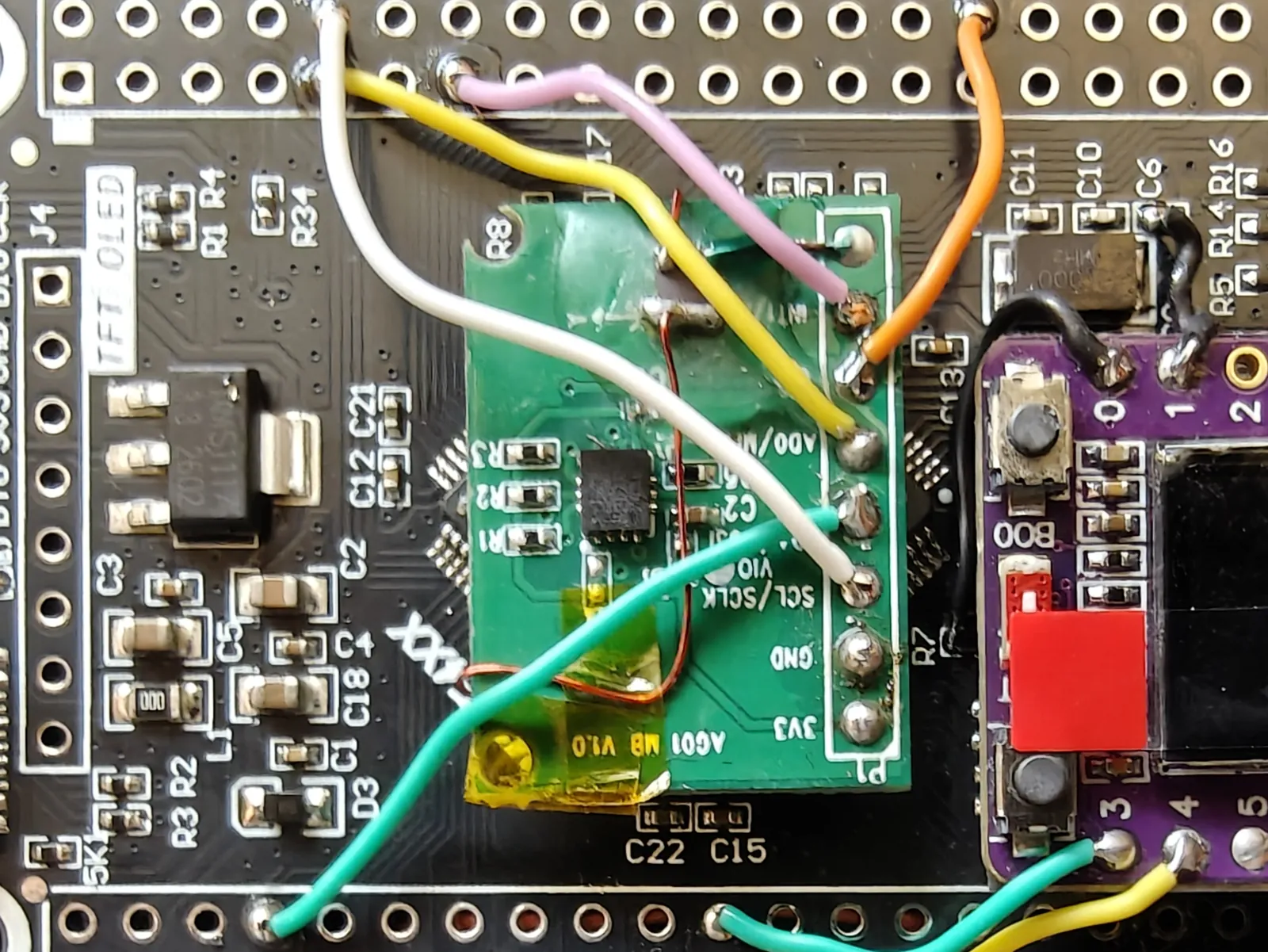
White SCL/SCLK, green SDA/MOSI, yellow AD0/MISO, orange CS, pink INT1. The two pads
nearest the corner, 3V3 and GND, are bare.
GPS
The reference build uses a RushFPV module built on a u-blox M10 receiver. Below are its key specifications, from RushFPV's published figures.
RushFPV M10
| Constellations | GPS, GLONASS, Galileo, BeiDou — up to 4 at once, plus SBAS and QZSS |
| Receive channels | 72 |
| Update rate | 1–10 Hz |
| Sensitivity | −162 dBm |
Four wires, on USART2, with the pair crossed: the module's RX goes to the STM32's transmit
pin, and its TX to the receive pin.
| GPS pad | Signal | STM32 |
|---|---|---|
VCC |
Supply | 5V |
GND |
Ground | GND |
RX |
← STM32 TX | PA2 |
TX |
→ STM32 RX | PA3 |
Note
Check what your module wants before you connect it. Supply voltage is the vendor's
choice, not u-blox's — the receiver itself runs at 3.3 V, but most boards carry their own
regulator and expect more. The reference module's pad is labelled 5V, so it goes to the
flight computer's 5 V rail.
Mounting
It goes on the patch of passives between J4 and the STM32, patch face up. That area is not
flat. Pack the low ground up with small pieces of foam tape until it is level with the tallest
parts, then put a piece on the module's own back to stick it down.
Note
The patch has to see the sky. Mount it face up with nothing metallic or carbon above it, and as far from the ESCs and any video transmitter as the frame allows. Switching noise from either is the likeliest reason a fix never arrives.
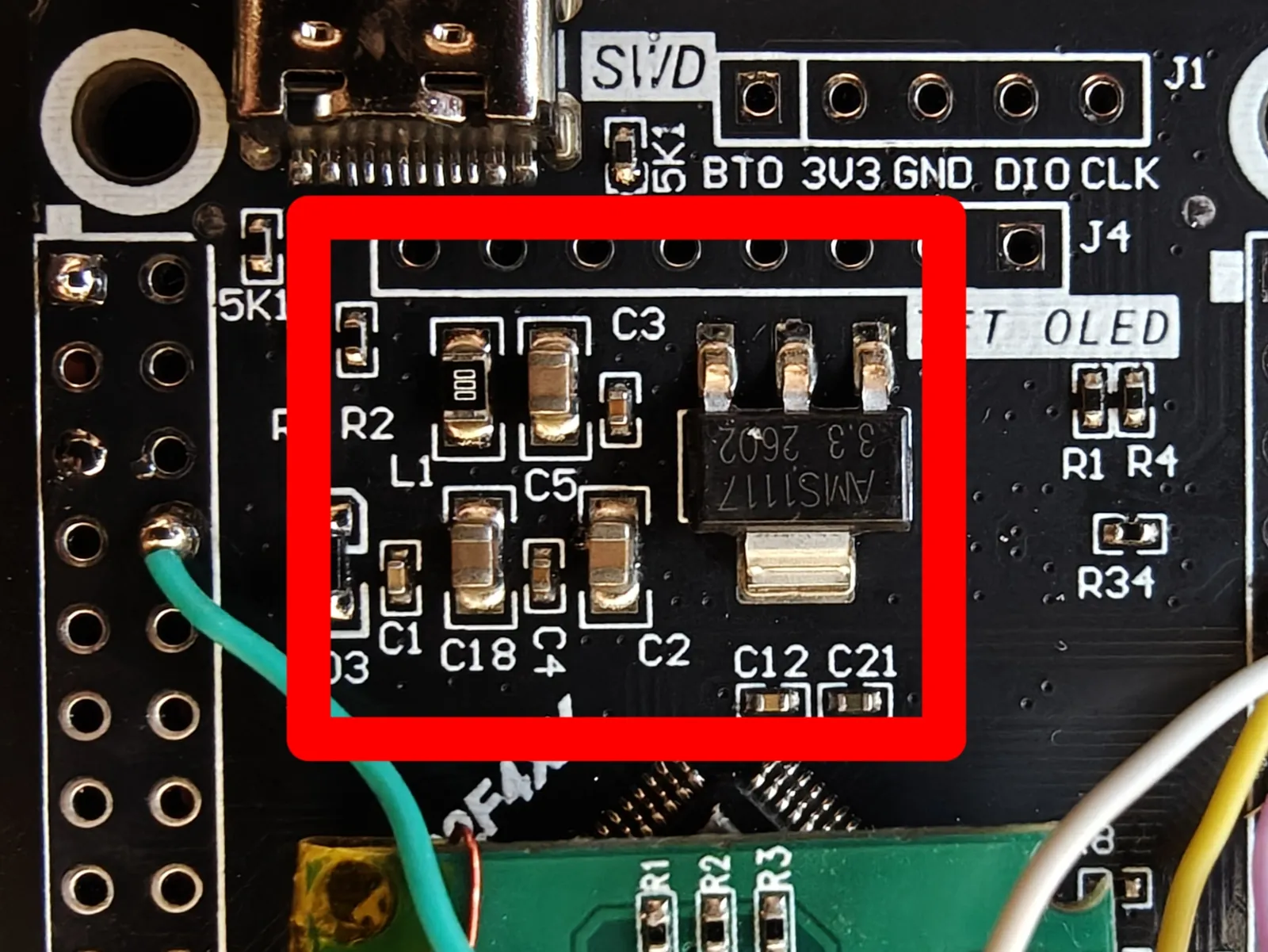
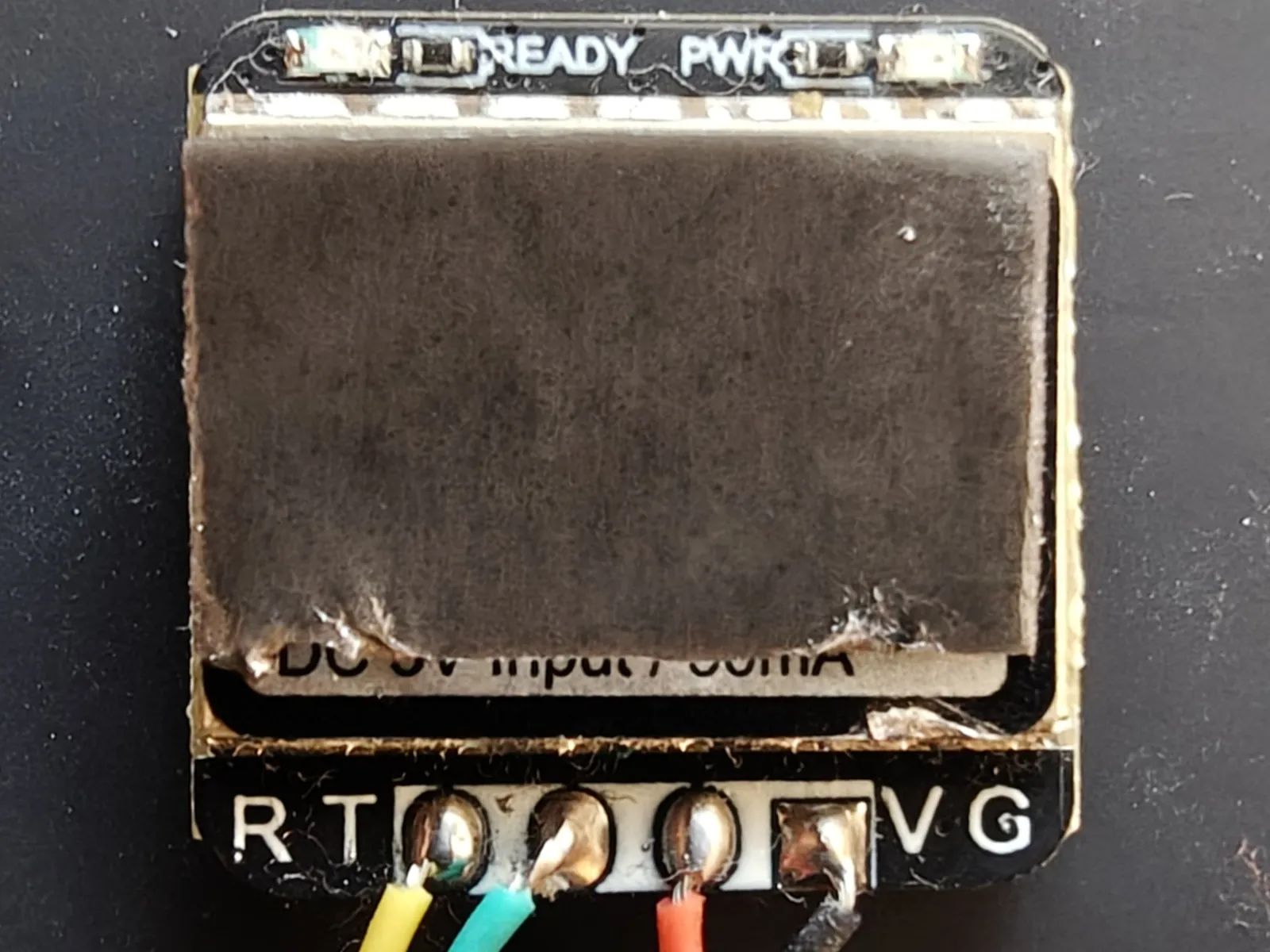
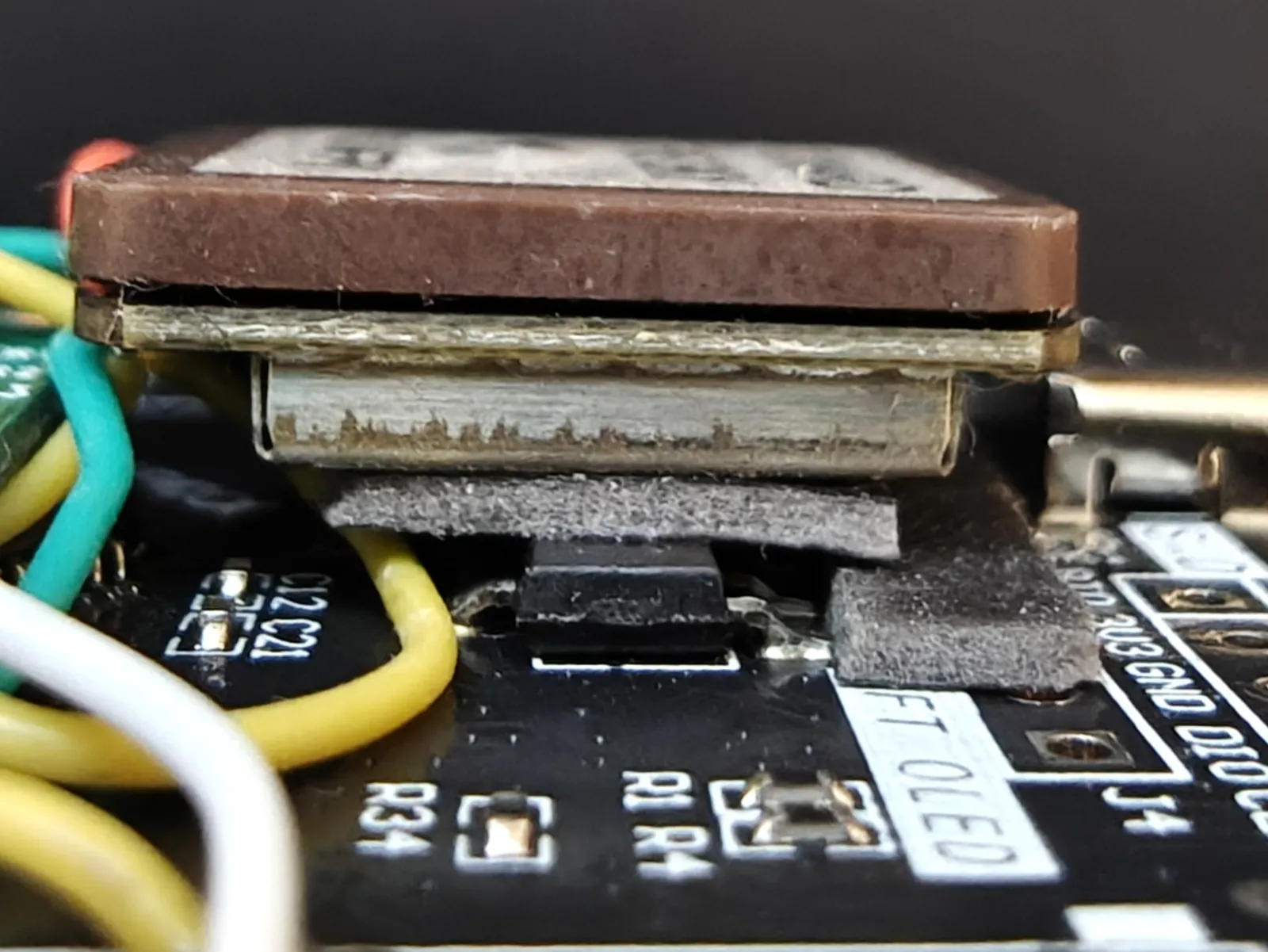
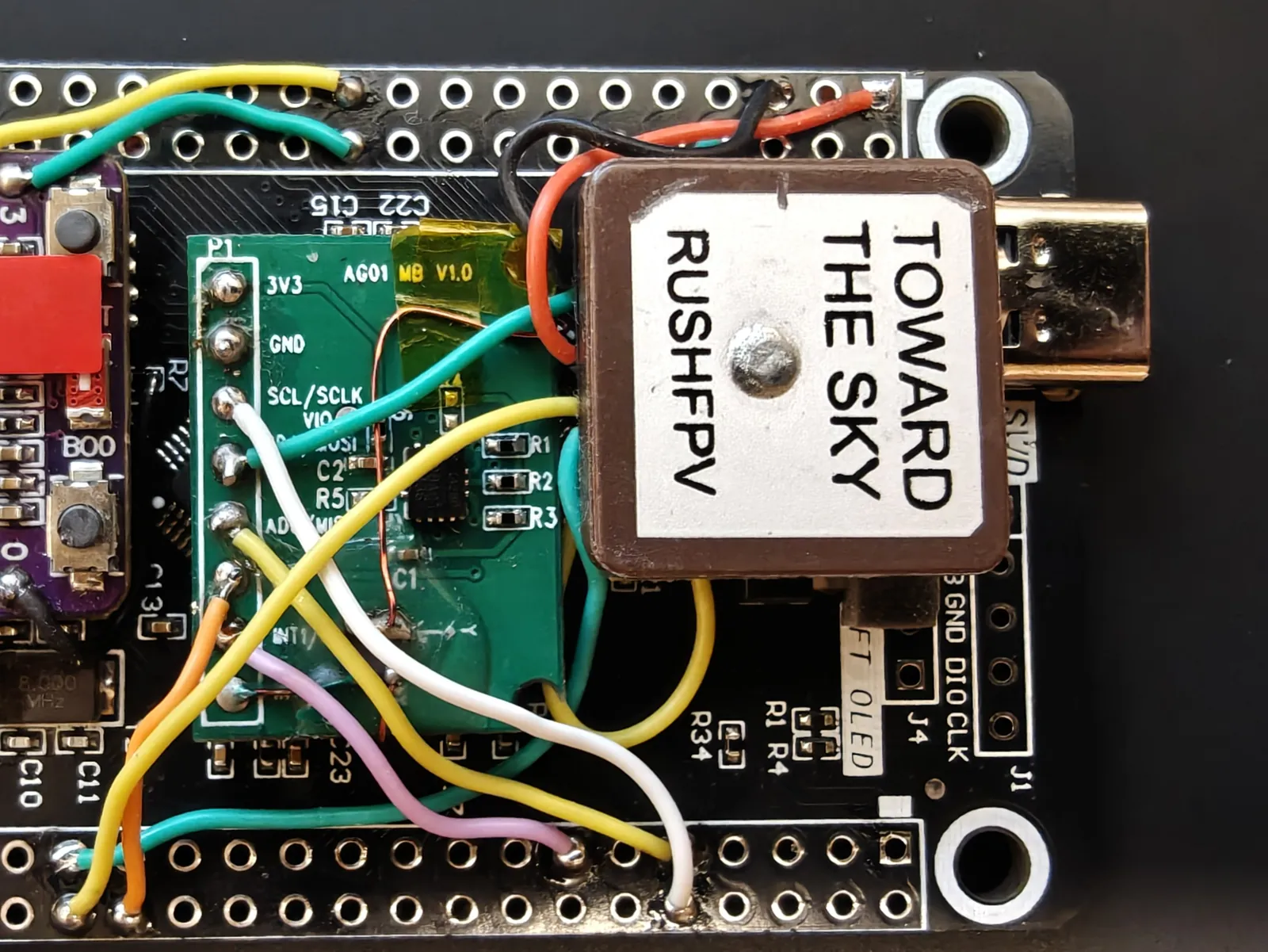
Top left — the suggested spot. Top right — tape on the module's back.
Bottom left — the packing from the side, filling in around the taller parts.
Bottom right — the finished mount.
RC receiver — ELRS
Any ExpressLRS receiver will do; they all speak CRSF over a UART. The reference build uses a HappyModel EP1, a 2.4 GHz receiver.
Four wires, on USART6 at 420000 baud, with the pair crossed:
| Receiver pad | Signal | STM32 |
|---|---|---|
VCC |
Supply | 5V |
GND |
Ground | GND |
TX |
→ STM32 RX | PC7 |
RX |
← STM32 TX | PC6 |
The link is not receive-only. The firmware sends CRSF telemetry back the other way — GPS, battery, altitude and a heartbeat — so the STM32's transmit pin has to reach the receiver as well.
It goes on a piece of foam tape in the space left beside the GPS, the same way the other two are held down. That spot is convenient rather than required — the receiver needs its four wires and a clear antenna, and nothing else. Put it wherever the airframe has room.
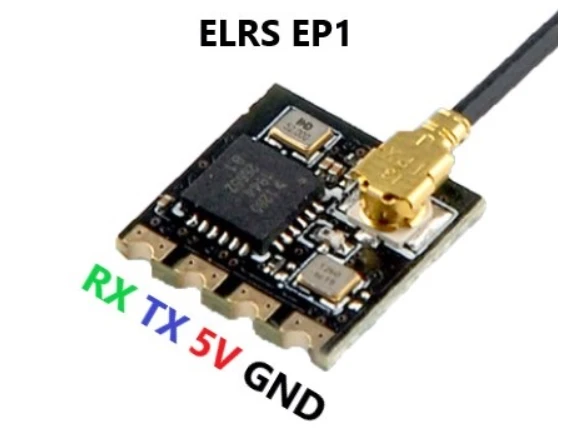
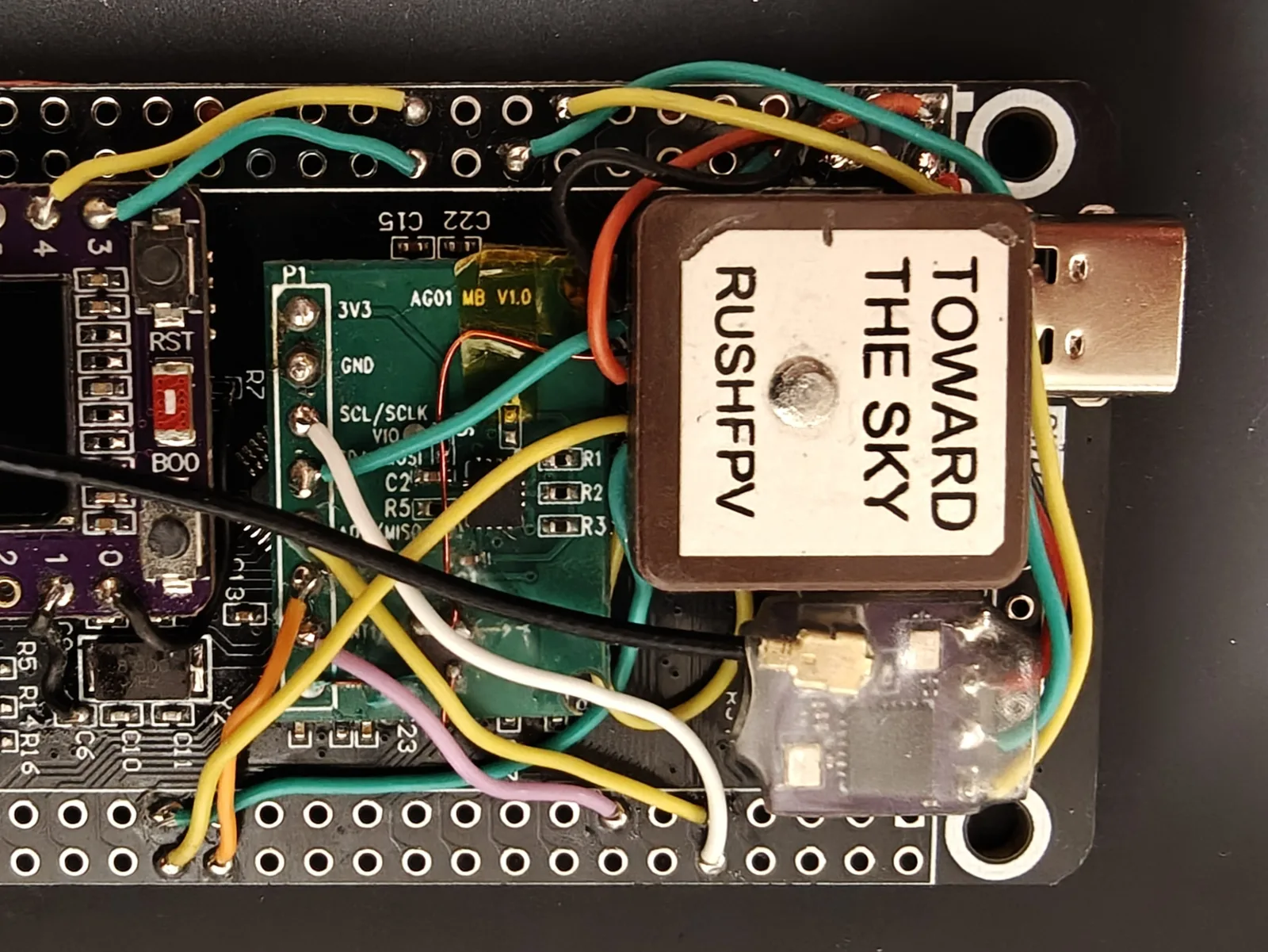
Left — the pad order along the edge. Right — mounted in the space beside the GPS.
Note
Only the exposed tip radiates — the coax feeding it does not. Keep the tip straight and clear of carbon and metal, and never coil it. A dipole is deaf off its ends, so lay the tip across the airframe rather than pointing it at where you stand.
Compass
The QMC5883P on the M100-5883 GPS module, on I2C1 over the same cable as the GPS. Its mounting
is a Kconfig choice named by where the module's connector points, and the iron of the frame is
calibrated from the ground station's compass page: six poses, a turn on each, stored on the
flight computer. The heading the ground station draws is true, not magnetic, by one offset in
Kconfig (STM32_MAG_HEADING_OFFSET_CDEG) that covers the local declination and any yaw the
module sits off the nose: point the nose at a known bearing and enter the difference the rose
shows. Siting matters more than wiring — motors and current-carrying wire are what corrupt it,
and the stored calibration does not cover what they add while running (TBD(#45)).
Barometer
A DPS310 on I2C1, wired in parallel with the compass. The reference build uses a MicoAir
module, model TBD(#46).
| Module pad | Signal | STM32 |
|---|---|---|
VCC |
Supply | 3V3 |
GND |
Ground | GND |
SCL |
I2C clock | PB8 |
SDA |
I2C data | PB9 |
- 3.3 V only. The part's limit is 3.6 V.
- Address. The module answers at
0x77with itsSDOpin floating or high, and at0x76withSDOgrounded. The "Barometer (DPS310)" Kconfig menu names which, beside the oversampling and rate. - Pull-ups. The firmware enables none on this bus, so the two modules' own resistors set it.
With everything unpowered, measure
SDAto 3.3 V: the combined value should stay above about 1.1 kΩ. If it is lower, remove one module's pair. - Siting matters more than wiring. Mount it inside the frame, out of the prop wash and any direct airflow, under a piece of open-cell foam: moving air reads as altitude.
A barometer that does not answer stops the flight computer at boot, as a missing compass does.
Once running, it gives height above where the aircraft was powered up, zeroed again at every
arm. That height reaches the handset as its Alt sensor and the flight log as sensor_baro.
Telemetry radio
TBD(#4) — planned. The MAVLink link down to a ground station. It hangs off the bridge on
GPIO20 and GPIO21, not off the flight computer.
Buzzer
TBD(#6) — the buzzer runs from GPIO10 on the bridge. It is already fitted in the
photographs on The brain; wiring it is a stage of its own.
Locator beacon
TBD(#4) — planned. A loud buzzer and a high-intensity LED, for finding the aircraft after
it lands somewhere you did not intend. Separate from the buzzer above, which is a
status tone on the bridge and nowhere near loud enough for the job.